


Fortinet FCP_FGT_AD-7.4 Test Engine Dumps Training With 50 Questions
FCP_FGT_AD-7.4 Questions Pass on Your First Attempt Dumps for FCP in Network Security Certified
Fortinet FCP_FGT_AD-7.4 Exam Syllabus Topics:
| Topic | Details |
|---|---|
| Topic 1 |
|
| Topic 2 |
|
| Topic 3 |
|
| Topic 4 |
|
| Topic 5 |
|
| Topic 6 |
|
| Topic 7 |
|
| Topic 8 |
|
| Topic 9 |
|
| Topic 10 |
|
| Topic 11 |
|
| Topic 12 |
|
NEW QUESTION # 23
Refer to the exhibit, which contains a radius server configuration.
An administrator added a configuration for a new RADIUS server. While configuring, the administrator selected the Include in every user group option.
What will be the impact of using Include in every user group option in a RADIUS configuration?
- A. This option places the RADIUS server, and all users who can authenticate against that server, into every FortiGate user group.
- B. This option places the RADIUS server, and all users who can authenticate against that server, into every RADIUS group.
- C. This option places all users into every RADIUS user group, including groups that are used for the LDAP server on FortiGate.
- D. This option places all FortiGate users and groups required to authenticate into the RADIUS server, which, in this case, is FortiAuthenticator.
Answer: A
Explanation:
The Include in every User Group option adds the RADIUS server and all users that can authenticate against it, to every user group created on FortiGate. So, you should enable this option only in very specific scenarios (for example, when only administrators can authenticate against the RADIUS server and policies are ordered from least restrictive to most restrictive).
NEW QUESTION # 24
How do you format the FortiGate flash disk?
- A. Load the hardware test (HQIP) image.
- B. Execute the CLI command execute formatlogdisk.
- C. Load a debug FortiOS image.
- D. Select the format boot device option from the BIOS menu.
Answer: D
Explanation:
Select the format boot device option from the BIOS menu.
Selecting the format boot device option from the BIOS menu allows you to format the FortiGate flash disk. This option is typically used when you need to reformat the flash disk to resolve issues or prepare it for a fresh installation of the operating system. However, it's important to note that formatting the flash disk will erase all data on it, so it should be done carefully.
Reference: https://kb.fortinet.com/kb/documentLink.do?externalID=FD46582
https://kb.fortinet.com/kb/viewContent.do?externalId=10338
NEW QUESTION # 25
Which two statements about advanced AD access mode for the FSSO collector, agent are true?
(Choose two.)
- A. It uses the Windows convention for naming; that is, Domain\Username.
- B. It is only supported if DC agents are deployed.
- C. It supports monitoring of nested groups.
- D. FortiGate can act as an LDAP client to configure the group filters.
Answer: C,D
Explanation:
The correct statements about the advanced AD access mode for the FSSO collector agent are:
A. FortiGate can act as an LDAP client to configure the group filters.
In advanced AD access mode, FortiGate can use LDAP (Lightweight Directory Access Protocol) to query and retrieve user and group information from Active Directory for configuring group filters.
C. It supports monitoring of nested groups.
Advanced AD access mode does support monitoring of nested groups, allowing for a more comprehensive view of user group memberships.
NEW QUESTION # 26
Which three strategies are valid SD-WAN rule strategies for member selection? (Choose three.)
- A. Lowest Cost (SLA) with load balancing
- B. Best Quality with load balancing
- C. Lowest Quality (SLA) with load balancing
- D. Manual with load balancing
- E. Lowest Cost (SLA) without load balancing
Answer: A,B,D
NEW QUESTION # 27
Refer to the exhibit.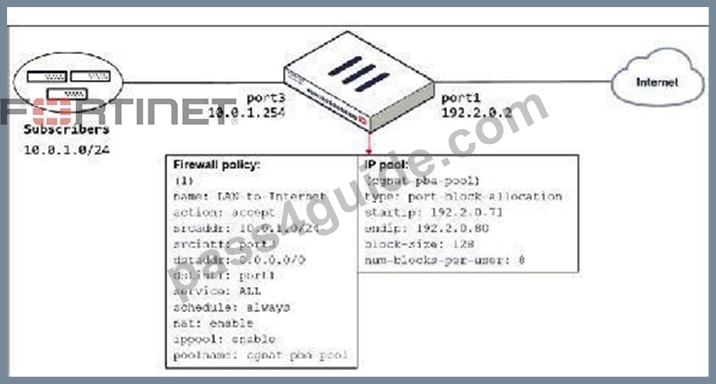
The exhibit shows a diagram of a FortiGate device connected to the network and the firewall policy and IP pool configuration on the FortiGate device.
Which two actions does FortiGate take on internet traffic sourced from the subscribers? (Choose two.)
- A. FortiGate generates a system event log for every port block allocation made per user.
- B. FortiGate allocates port blocks per user, based on the configured range of internal IP addresses.
- C. FortiGate allocates 128 port blocks per user.
- D. FortiGate allocates port blocks on a first-come, first-served basis.
Answer: A,D
Explanation:
B: FortiGate allocates port blocks on a first-come, first-served basis
C: For logging purposes, when FortiGate allocates a port block to a host, it generates a system event log to inform the administrator Not A: FortiGate allocates a block size and number per host for a range of external addresses Not D: It allows 8 blocks of 128 ports per host FortiGate allocates port blocks on a first-come, first-served basis.
For logging purposes, when FortiGate allocates a port block to a host, it generates a system event log to inform the administrator.
NEW QUESTION # 28
The HTTP inspection process in web filtering follows a specific order when multiple features are enabled in the web filter profile.
What order must FortiGate use when the web filter profile has features enabled, such as safe search?
- A. Static URL filter, FortiGuard category filter, and advanced filters
- B. FortiGuard category filter and rating filter
- C. DNS-based web filter and proxy-based web filter
- D. Static domain filter, SSL inspection filter, and external connectors filters
Answer: A
Explanation:
The correct order for the HTTP inspection process in web filtering, specifically when features like safe search are enabled in the web filter profile, is:
B. Static URL filter, FortiGuard category filter, and advanced filters
This means that the FortiGate device will first check against the Static URL filter, followed by the FortiGuard category filter, and then any additional advanced filters configured in the web filter profile.
This sequence allows for a systematic evaluation of the URL against different criteria, ensuring comprehensive web filtering.
The HTTP Inspection Order (Static URL Filter -> FortiGuard Category Filter -> Advanced Filters)
NEW QUESTION # 29
Which two statements are true regarding FortiGate HA configuration synchronization? (Choose two.)
- A. Incremental configuration synchronization can occur only from changes made on the primary FortiGate device.
- B. Checksums of devices are compared against each other to ensure configurations are the same.
- C. Checksums of devices will be different from each other because some configuration items are not synced to other HA members.
- D. Incremental configuration synchronization can occur from changes made on any FortiGate device within the HA cluster
Answer: A,B
Explanation:
In FortiGate HA (High Availability) configuration, checksums of device configurations are compared to ensure they are synchronized and identical across the cluster. Incremental synchronization can only happen from changes made on the primary device to ensure consistency and integrity across the cluster members.
Changes made on non-primary devices do not initiate synchronization.
References:
* FortiOS 7.4.1 Administration Guide: HA Configuration Synchronization
NEW QUESTION # 30
Refer to the exhibit.
Which algorithm does SD-WAN use to distribute traffic that does not match any of the SD-WAN rules?
- A. All traffic from a source IP to a destination IP is sent to the same interface.
- B. Traffic is distributed based on the number of sessions through each interface.
- C. All traffic from a source IP is sent to the same interface
- D. Traffic is sent to the link with the lowest latency.
Answer: A
Explanation:
For traffic that does not match any of the defined SD-WAN rules, the default implicit SD-WAN rule is applied. By default, the FortiGate uses a "source-destination IP-based" algorithm, which means all traffic from a specific source IP to a specific destination IP is sent through the same interface. This ensures that a consistent path is used for traffic between the same source and destination IP addresses. Options B, C, and D do not apply because the default algorithm does not prioritize by latency, session count, or source IP alone.
References:
* FortiOS 7.4.1 Administration Guide: SD-WAN Load Balancing Algorithms
NEW QUESTION # 31
Which statement is correct regarding the use of application control for inspecting web applications?
- A. Application control does not require SSL inspection to identify web applications.
- B. Application control signatures are organized in a nonhierarchical structure.
- C. Application control can identify child and parent applications, and perform different actions on them.
- D. Application control does not display a replacement message for a blocked web application.
Answer: C
Explanation:
Application control in FortiGate can identify both parent and child applications within web applications.
This allows for granular control and the ability to perform different actions based on the specific application detected.
Application control is a feature that allows FortiGate to inspect and control the use of specific web applications on the network. When application control is enabled, FortiGate can identify child and parent applications, and can perform different actions on them based on the configuration.
The FortiGuard application control signature database is organized in a hierarchical structure. This gives you the ability to inspect the traffic with more granularity. You can block Facebook applications while allowing users to collaborate using Facebook chat.
NEW QUESTION # 32
Which additional load balancing method is supported in equal cost multipath (ECMP) load balancing when SD-WAN is enabled?
- A. Source IP based
- B. Weight based
- C. Source-destination IP based
- D. Volume based
Answer: D
Explanation:
Volume load balancing method is supported in equal cost multipath (ECMP) load balancing when SD- WAN is enabled.
What is load balancing method?
Load balancing means are regarded as a form of an algorithms or method that is used to rightly share an incoming server request or traffic in the midst or among servers that is from the server pool.
Note that Volume load balancing method is supported in equal cost multipath (ECMP) load balancing when SD-WAN is enabled as that is its role.
NEW QUESTION # 33
Examine the IPS sensor and DoS policy configuration shown in the exhibit, then answer the question below.
When detecting attacks, which anomaly, signature, or filter will FortiGate evaluate first?
- A. ip_src_session
- B. Location: server Protocol: SMTP
- C. IMAP.Login.brute.Force
- D. SMTP.Login.Brute.Force
Answer: C
Explanation:
IMAP.Login.brute.Force
Anomalies can be zero-day or denial of service attack
Are Detected by behaivoral analysis:
Rate Based IPS Signatures.
DoS Policies.
Protocol Constraint Inspections.
DoS policy disabled in this scenario.
NEW QUESTION # 34
Refer to the exhibit.
Examine the intrusion prevention system (IPS) diagnostic command.
Which statement is correct If option 5 was used with the IPS diagnostic command and the outcome was a decrease in the CPU usage?
- A. The IPS engine was blocking all traffic.
- B. The IPS engine will continue to run in a normal state.
- C. The IPS engine was inspecting high volume of traffic.
- D. The IPS engine was unable to prevent an intrusion attack.
Answer: C
Explanation:
If there are high-CPU use problems caused by the IPS, you can use the diagnose test application ipsmonitor command with option 5 to isolate where the problem might be. Option 5 enables IPS bypass mode.
In this mode, the IPS engine is still running, but it is not inspecting traffic.
If the CPU use decreases after that, it usually indicates that the volume of traffic being inspected is too high for that FortiGate model.
If the CPU use remains high after enabling IPS bypass mode, it usually indicates a problem in the IPS engine, which you must report to Fortinet Support.
If there are high-CPU use problems caused by the IPS, you can use the diagnose test application ipsmonitor command with option 5 to isolate where the problem might be. Option 5 enables IPS bypass mode. In this mode, the IPS engine is still running, but it is not inspecting traffic. If the CPU use decreases after that, it usually indicates that the volume of traffic being inspected is too high for that FortiGate model.
NEW QUESTION # 35
The HTTP inspection process in web filtering follows a specific order when multiple features are enabled in the web filter profile.
Which order must FortiGate use when the web filter profile has features such as safe search enabled?
- A. Static URL filter, FortiGuard category filter, and advanced filters
- B. FortiGuard category filter and rating filter
- C. DNS-based web filter and proxy-based web filter
- D. Static domain filter, SSL inspection filter, and external connectors filters
Answer: A
Explanation:
FortiGate applies web filters in the following order: Static URL filter, FortiGuard category filter, Web content filter, Web script filter, and Antivirus scanning.
NEW QUESTION # 36
Refer to the exhibit, which shows a partial configuration from the remote authentication server.
Why does the FortiGate administrator need this configuration?
- A. To authenticate Any FortiGate user groups.
- B. To authenticate and match the TrainingOU on the RADIUS server.
- C. To authenticate only the Training user group.
- D. To set up a RADIUS server Secret
Answer: B
NEW QUESTION # 37
Which three pieces of information does FortiGate use to identify the hostname of the SSL server when SSL certificate inspection is enabled? (Choose three.)
- A. The subject alternative name (SAN) field in the server certificate
- B. The host field in the HTTP header
- C. The server name indication (SNI) extension in the client hello message
- D. The serial number in the server certificate
- E. The subject field in the server certificate
Answer: A,C,E
Explanation:
When SSL certificate inspection is enabled, FortiGate uses the following three pieces of information to identify the hostname of the SSL server:
A. The subject field in the server certificate
The subject field typically contains the common name (CN) that represents the hostname.
C. The server name indication (SNI) extension in the client hello message SNI is an extension to the TLS protocol that indicates the hostname to which the client is attempting to connect.
D. The subject alternative name (SAN) field in the server certificate
The SAN field can include additional hostnames (alternative names) that are valid for the certificate.
So, the correct choices are A, C, and D.
Fortigate firtsly uses SNI, if there is no SNI it uses Subject or Subject Alternatives.
During the exchange of hello messages at the beginning of an SSL handshake, FortiGate parses server name indication (SNI) from client Hello, which is an extension of the TLS protocol. The SNI tells FortiGate the hostname of the SSL server, which is validated against the DNS name before receipt of the server certificate. If there is no SNI exchanged, then FortiGate identifies the server by the value in the Subject field or SAN (subject alternative name) field in the server certificate.
NEW QUESTION # 38
Which three settings and protocols can be used to provide secure and restrictive administrative access to FortiGate? (Choose three.)
- A. SSH
- B. HTTPS
- C. Trusted authentication
- D. FortiTelemetry
- E. Trusted host
Answer: A,B,E
Explanation:
To provide secure and restrictive administrative access to FortiGate, the following three settings and protocols can be used:
A. SSH (Secure Shell)
SSH is a secure protocol that allows secure remote access to the FortiGate command-line interface (CLI).
C. Trusted host
Configuring trusted hosts allows you to restrict administrative access to specified IP addresses, providing an additional layer of security.
D. HTTPS (Hypertext Transfer Protocol Secure)
HTTPS is a secure protocol that enables secure access to the FortiGate web-based graphical user interface (GUI).
So, the correct choices are A, C, and D.
NEW QUESTION # 39
Refer to the exhibit.
The global settings on a FortiGate device must be changed to align with company security policies.
What does the Administrator account need to access the FortiGate global settings?
- A. Change password
- B. Enable restrict access to trusted hosts
- C. Enable two-factor authentication
- D. Change Administrator profile
Answer: D
Explanation:
Change Administrator profile
By default, there is a special profile named super_admin, which is used by the account named admin.
You can't change it. It provides full access to everything, making the admin account similar to a root superuser account.The prof_admin is another default profile. It also provides full access, but unlike super_admin, it applies only to its virtual domain-not the global settings of FortiGate. Also, you can change its permissions.
NEW QUESTION # 40
A network administrator wants to set up redundant IPsec VPN tunnels on FortiGate by using two IPsec VPN tunnels and static routes.
All traffic must be routed through the primary tunnel when both tunnels are up. The secondary tunnel must be used only if the primary tunnel goes down. In addition, FortiGate should be able to detect a dead tunnel to speed up tunnel failover.
Which two key configuration changes must the administrator make on FortiGate to meet the requirements?
(Choose two.)
- A. Enable Dead Peer Detection
- B. Enable Auto-negotiate and AutokeyKeep Alive on the phase 2 configuration of both tunnels.
- C. Configure a lower distance on the static route for the primary tunnel, and a higher distance on the static route for the secondary tunnel.
- D. Configure a higher distance on the static route for the primary tunnel, and a lower distance on the static route for the secondary tunnel.
Answer: A,C
NEW QUESTION # 41
FortiGate is integrated with FortiAnalyzer and FortiManager.
When a firewall policy is created, which attribute is added to the policy to improve functionality and to support recording logs to FortiAnalyzer or FortiManager?
- A. Policy ID
- B. Universally Unique Identifier
- C. (Sequence ID
- D. Log ID
Answer: B
Explanation:
When a firewall policy is created in FortiGate integrated with FortiAnalyzer and FortiManager, a Universally Unique Identifier (UUID) is added to the policy to support logging and management.
NEW QUESTION # 42
What are two features of collector agent advanced mode? (Choose two.)
- A. Advanced mode supports nested or inherited groups.
- B. In advanced mode, security profiles can be applied only to user groups, not individual users.
- C. In advanced mode, FortiGate can be configured as an LDAP client and group filters can be configured on FortiGate.
- D. Advanced mode uses the Windows convention -NetBios: Domain\Username.
Answer: C,D
Explanation:
Advanced mode allows for configuration as an LDAP client and supports group filtering directly on the FortiGate, as well as nested or inherited groups.
NEW QUESTION # 43
Which three strategies are valid SD-WAN rule strategies for member selection? (Choose three.)
- A. Best Quality with load balancing
- B. Lowest Quality (SLA) with load balancing
- C. Lowest Cost (SLA) with load balancing
- D. Manual with load balancing
- E. Lowest Cost (SLA) without load balancing
Answer: A,B,D
NEW QUESTION # 44
Refer to the exhibits.

The exhibits show the firewall policies and the objects used in the firewall policies.
The administrator is using the Policy Lookup feature and has entered the search criteria shown in the exhibit.
Which policy will be highlighted, based on the input criteria?
- A. Policies with ID 2 and 3.
- B. Policy with ID 5.
- C. Policy with ID 4.
- D. Policy with ID 1.
Answer: B
Explanation:
Policy with ID 5.
It's coming from port 3 - hits Facebook-Web (Application) from the screenshot it show that it allows http and https traffic (80, 443).
There are 3 rules related to port3
and two rules source LOCAL_CLIENT
this would leave us with Rule 1 & 5
Rule one Service is = ULL_UDP
Rule five = Internet Services
Destination port we are looking for is 443 (usually this is TCP)
So it had to be PID5
We are looking for a policy that will allow or deny traffic from the source interface Port3 and source IP address 10.1.1.10 (LOCAL_CLIENT) to facebook.com TCP port 443 (HTTPS). There are only two policies that will match this traffic, policy ID 2 and 5. In FortiGate, firewall policies are evaluated from top to bottom. This means that the first policy that matches the traffic is applied, and subsequent policies are not evaluated. Based on the Policy Lookup criteria, Policy ID 5 will be highlighted.
NEW QUESTION # 45
An administrator is configuring an Ipsec between site A and site B. The Remotes Gateway setting in both sites has been configured as Static IP Address. For site A, the local quick mode selector is 192.16.1.0/24 and the remote quick mode selector is 192.16.2.0/24.
How must the administrator configure the local quick mode selector for site B?
- A. 192.16.2.0/24
- B. 192.16.0.0/8
- C. 192.16.3.0/24
- D. 192.16.1.0/24
Answer: A
Explanation:
The local quick mode selector for site B should be configured to match the remote quick mode selector of site
A. In this case, the remote quick mode selector for site A is 192.16.2.0/24. Therefore, the correct answer is: B. 192.16.2.0/24 So, the administrator should configure the local quick mode selector for site B as 192.16.2.0/24 to ensure that the IPsec VPN configuration is consistent between the two sites.
NEW QUESTION # 46
......
FCP_FGT_AD-7.4 Practice Test Pdf Exam Material: https://vcepractice.pass4guide.com/FCP_FGT_AD-7.4-dumps-questions.html